

How to Link Shop Products to External Platforms
Note: This blog post contains affiliate links, however, I only recommend brands that I use and love.
If your business is predominantly through online shop listings and digital products, you may have multiple platforms for promoting and selling your products. Sometimes you want to have them all hosted through a one stop shop for your website visitors.
There is a way to link your Squarespace shop listing to your external platforms with a little bit of coding. Keep scrolling for the steps to get started.


Getting Started Linking Products on Your Site
Add your product listing to your Squarespace site as you normally would. For this type of product, you will want to select Service. Be sure to include details, images, fine print, etc.
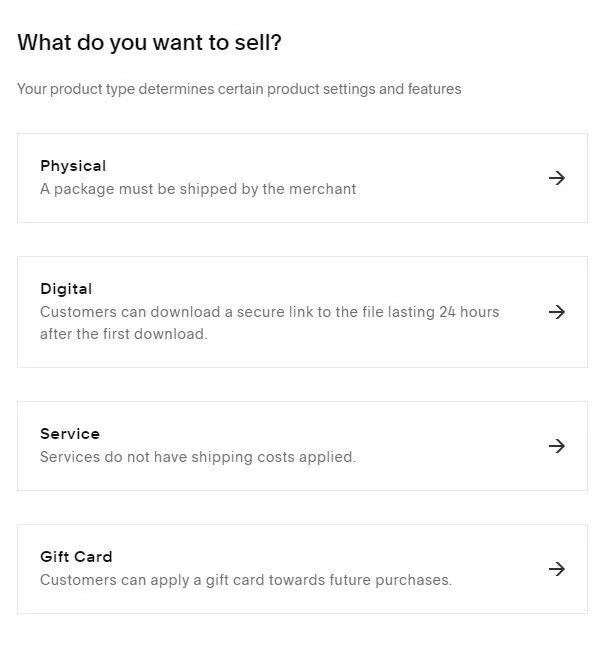
Visit your Design panel > Custom CSS.
Paste in the following code:
.sqs-add-to-cart-button-wrapper {
    display: none !important;
}
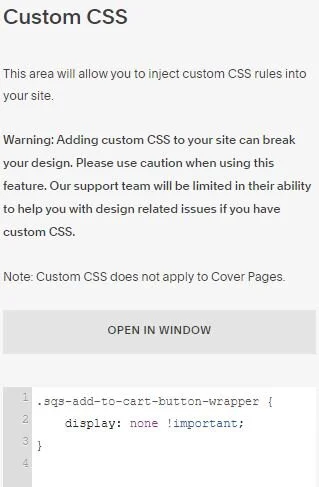
This will remove the shop button/add to cart option.
Go back into your product item section and add a “Enroll Now” text in your heading 2 font. Link this text to your external platform such as a shop page on Teachable or Kajabi.
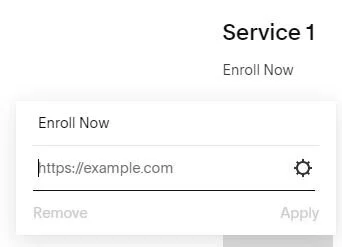
Next add the following code to your Custom CSS panel to make your Enroll Now text look like a button.
//Hyperlink Style//
h2 a {
  font-size: 20px;
  border-bottom-style: none !important;
  font-family: brandon-grotesque;
  font-color: #e8e3d6;
  background: #dba583;
  line-height: 1em;
  margin-top: 10px;
  padding: 1em 1.75em;
}
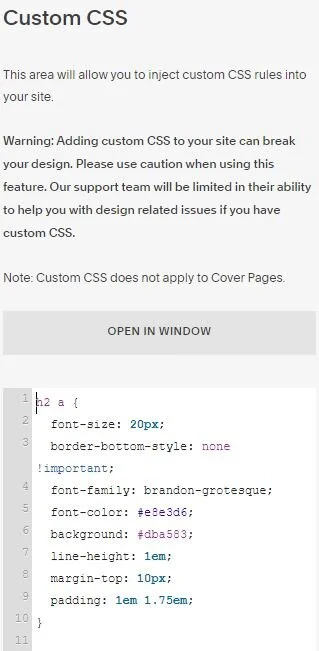
You can update the font family, font color and background accordingly based on your branding.
Try it out for yourself!
Give this method a shot for your website! It should help you streamline pages for your website visitors and increase your sales. If you have questions to comment below or reach out on Instagram


One Time Purchase gives you immediate access to the masterclass where I’m sharing how I onboard my design clients.
A masterclass with Hayley Fedders that covers the onboarding process for clients in your graphic design business.
Easy to understand descriptions for how to make implement steps immediately into your business (no need to be an organization whiz).
Enroll Now