Once you’ve developed the brand concept and put together a brand identity, it’s time to present all of your hard work to your client!

During the brand presentation phase of the branding process, I like to compile the concept into a PDF and present that to the client in real time. This gives you an opportunity to walk your client through your design choices and allows them to ask questions. You can also provide next steps for the client to provide feedback if necessary.
In this blog, we’re going to take a more detailed look at what to include in your brand presentation PDF and provide you with presentation pointers so you can confidently showcase your brand concept and leave your client impressed and ready to move forward!
The Brand Presentation PDF
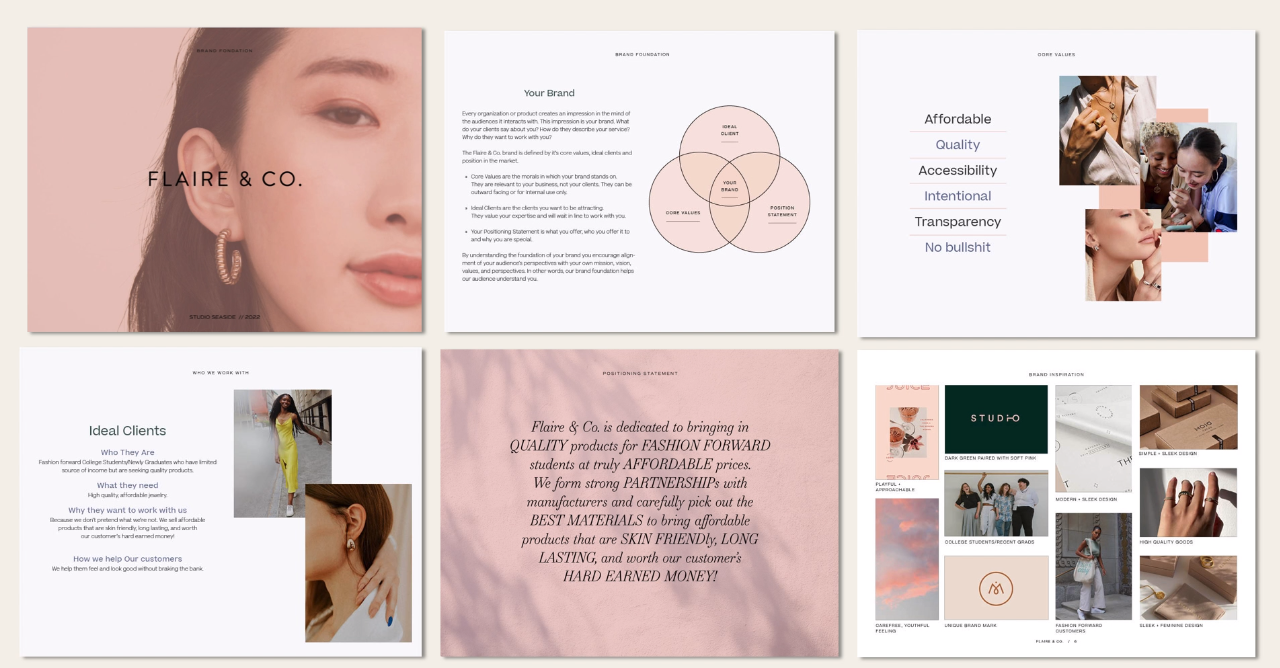
Brand Foundation
The beginning of your presentation document should reiterate your client’s brand foundation.
This includes:
Core Values
Ideal Clients
Competitor Research
Position in the Market
Moodboard
Style Direction
Overall Creative Direction
This has been the basis of all of your design decisions, and by including it in the presentation, you’re reminding the client that they’ve already approved the creative direction of the brand concept.
Primary Logo
The first appearance of the primary logo should be clear and simple. I recommend using either a white background, brand color, or appropriate brand image as the background of the page. Be sure that the background doesn’t distract or degrade the integrity of the logo - you want it to really stand out!


The next page you show your client can go into more detail about your design choices for font, color, and form. This page needs to explain how you arrived at this logo solution for your client’s brand.
This is a great opportunity to reinforce the client’s core values, positioning statement, ideal client, and goals. We’re creating a brand that is rooted in that strategy, so you want to make sure you’re explaining your choices to the client.

Logo Mark
Depending on the branding package or the scope of your design, you’ll want to present the logo mark or submark next. Again, be sure to explain your design choices and reinforce the brand foundation that directed your decisions.
It’s a good idea to show these marks with a dark background and a lighter background so the client can visualize them being used in different ways.

Logo Variations
To convey the versatility of your concept, show your client an example of the logo variations - combine different brand colors with the variations to make it fun for the client and help them envision how they can use their new brand!

I recommend including a more simple page where all of the logo variations and marks are displayed together on a plain background. Label them as well so your client can understand exactly what their brand identity includes and how they might be used.
Brand Colors
I like to provide the hex codes for the brand colors, as well as give them a name! For example, if you have a dark green color, you might name it “pine forest”, etc.
I also provide additional tints for each brand color to show more versatility.

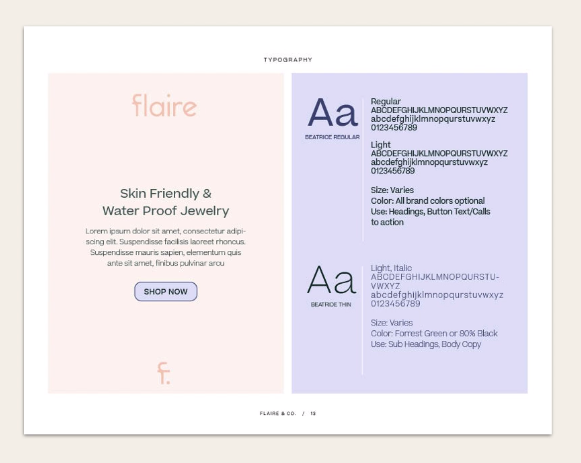
Typography
Pro tip: If you’re setting up your presentation PDF in Adobe InDesign, go ahead and format your typography page first! Set up the heading and paragraph styles so you can easily format the rest of your document around those settings.
Mockups
This is one of the most important sections of your brand presentation!
You want to show the concept in real world solutions, so be sure to choose mockups that are consistent with the scope of the brand you’re designing. For example, if you’re creating an online brand, consider a website mockup or social media images.

Business cards or name tags may not be applicable, so be sure to consider how the client will actually use their branding.
The mockups are going to be what really sells your client on your brand concept. You want to spend a lot of time and care creating mockups that give the client an idea of real world scenarios that their brand is going to be used in. Use this time to get your client really excited about the possibilities of their new brand identity!
Next Steps
The final section of your presentation document should provide the client with clear next steps.
I like to include specific feedback questions that the client can answer and give simple instructions on providing me with that feedback.
Tips for Presenting Your Brand Concept
Present in real time
Presenting in real time is going to help remove any first impressions that could potentially be negative without having you explain the design choices.
“No feedback needed today”
Reassure your client that you don’t expect them to provide any feedback on the call. The call is simply for you to walk them through the concept so that you can clearly explain your rationale behind the brand identity. They will have time to review the document and give you feedback later.
Go page-by-page
Walk your client through the presentation page-by-page. You’ll want to go over the brand foundation - even though the client has seen it already - so that you can reinforce your design decisions.
You may want to practice before you do a presentation for the first time! It’s totally normal to feel nervous, but remember that your creative direction has been approved, so they shouldn’t be surprised by the concept you’re presenting.
Next Steps
At the end of the presentation, talk about next steps for the client’s feedback. Let them know that you are going to send them the presentation and if they have any feedback they can respond via email (or your communication preference).
Now you have a starting point for confidently presenting your branding concepts to your clients!
If you want more resources for this process (including a presentation template, example presentation video, and email swipe copy), check out Brand Process Savvy. You’ll get all of this and more in this start-to-finish guide on streamlining your design process!

Brand Style Guide Template
$150
Set your clients up for success and save yourself hours of time with the Brand Style Guide Template. This template includes everything your client will need to utilize their new brand identity successfully. Sections include; brand strategy, logo variations, color palette, file organization, brand identity applied and more.