Note: This blog post contains affiliate links, however, I only recommend brands that I use and love.
Customizing your website to stand out from the rest, doesn’t have to be difficult. With an Adobe Fonts account and your eye for design, you can update your website to go beyond the standard settings and truly make it your own.
Please note that this post is for Squarespace 7.0 websites only.
To begin, make sure you have an Adobe Creative Cloud account. We will be using Adobe Fonts for the customization.
Selecting Your Custom Fonts
Before you can add your custom fonts to your Squarespace website, you will need to log in to your Adobe Fonts account and create a web project. You can discover the steps to complete that process through Adobe’s support here.
Once your web project is created, you will see your HTML code for your customization. This code is unnecessary, however, you will need the website project ID.
Adding Your Fonts to Squarespace
You can get your project ID number within your Adobe Fonts account under the ‘My Adobe Fonts’ option located in the top right corner.
Within the Web Projects panel, you can find the project you created specifically for your website. Be sure to copy your Project ID right above the embed code.
After your Project ID is copied, log into your Squarespace site where you would like your custom fonts to appear. Within the Home Menu, select Settings and then Advanced.
Find the External API Keys options in your Advanced menu. Next, scroll to the Adobe Fonts Project ID. Paste in your copied Project ID from your Adobe Fonts account. Then select Save.
Incorporating Your Fonts into Your Website Design
Now that you have added in your Project ID number to your website, your selected fonts will now appear on your site styles. When selecting and finding your new font, be sure to utilize the Search box in the font options menu. You’re ready to go!
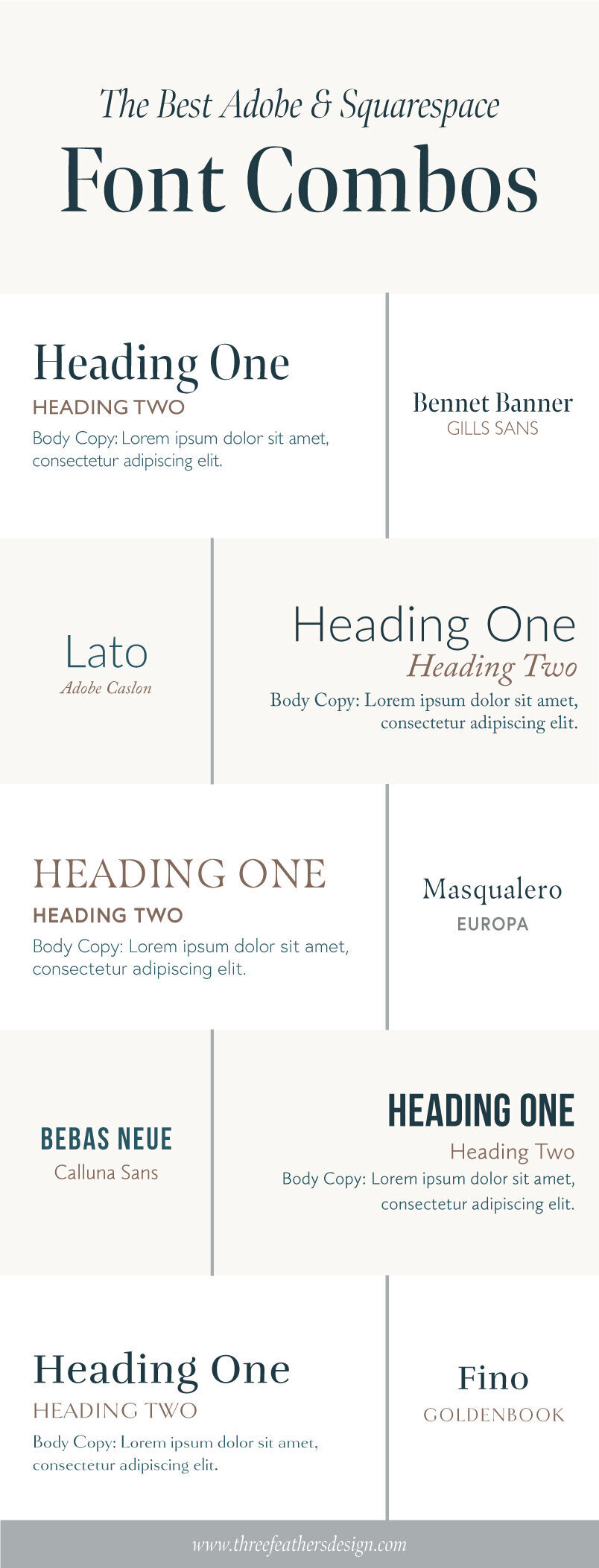
Our Favorite Font Combinations
Need some inspiration for your Adobe Fonts web project? Check out some of our favorite Adobe font combinations below!